
Decoding FSD 13.2: What’s Actually New and Improved
Tesla’s Full Self-Driving (Supervised) 13.2 release arrived with the usual wave of hype, but separating marketing from tangible improvements requires a closer look. Owners are consistently reporting a noticeable increase in smoothness, particularly during lane changes. The system feels less hesitant, making maneuvers that previously felt jerky now more fluid. This isn't just about comfort, it's about building trust in the system's decision-making.
A significant focus of this update appears to be on handling unprotected left turns, a perennial challenge for autonomous systems. While still not perfect, many users report FSD 13.2 exhibiting more cautious and deliberate behavior, taking more time to assess gaps in traffic before committing. The improvements aren’t universal – some are seeing little to no difference – but the trend is positive. These are subjective observations; your experience will vary based on where you drive.
The introduction of self-cleaning cameras is another key feature. The idea is simple: use the windshield wiper fluid to periodically clean the camera lenses, ensuring optimal visibility. Early reports on its effectiveness are mixed. Some owners praise the system for maintaining clear camera views, especially in dusty or rainy conditions, while others find it doesn’t fully remove stubborn grime. The system's activation frequency also seems to vary based on driving conditions and individual vehicle settings.
However, FSD 13.2 isn’t a magic bullet. Many owners still report disengagements in complex scenarios, such as navigating construction zones or dealing with unpredictable pedestrian behavior. Phantom braking, while reduced in some cases, remains an issue for a subset of users. FSD 13.2 is a Level 2 system. You must keep your hands on the wheel and be ready to take over instantly. Don’t treat it as fully autonomous.
Tesla continues to refine the underlying neural networks that power FSD, and each release brings incremental improvements. The shift towards end-to-end deep learning is a long-term goal, but 13.2 feels like a solid step in that direction. The improvements in lane changes and unprotected left turns suggest that Tesla is making progress in addressing some of the most challenging aspects of autonomous driving. It's a process of constant iteration and refinement.
Initial Setup: Ensuring Your Tesla is FSD-Ready
Before you can even think about optimizing FSD 13.2, you need to ensure your Tesla is actually compatible and properly configured. The vast majority of vehicles currently receiving FSD updates are equipped with Hardware 4 (HW4), which offers significantly more processing power than the older Hardware 3 (HW3). While HW3 can technically run FSD, the experience is demonstrably slower and less reliable. Be aware that Tesla is no longer installing HW3 in new vehicles.
The first step is verifying you have the latest software update. Navigate to Controls > Software in your Tesla’s touchscreen. The system will automatically check for updates and download them if available. This process can take a significant amount of time, so it’s best to initiate it while the car is parked and connected to a stable Wi-Fi network. Troubleshooting update issues often involves restarting the car or contacting Tesla support.
Your Tesla account and profile are also crucial. Ensure your payment information is up-to-date if you’re a subscriber to FSD. Double-check that your driver profile settings are correctly configured, including your preferred driving mode and safety features. A properly configured profile ensures FSD operates according to your preferences and enhances the overall experience.
Even with HW4, features vary by region and your specific subscription. Tesla’s feature availability is notoriously complex, so refer to the official Tesla support documentation for your specific vehicle configuration.
- Verify Hardware: Confirm you have HW4 if possible.
- Check for Updates: Navigate to Controls > Software.
- Account Configuration: Ensure payment and driver profile are accurate.
- Regional Availability: Confirm FSD features are available in your region.
Navigating the New FSD Interface and Settings
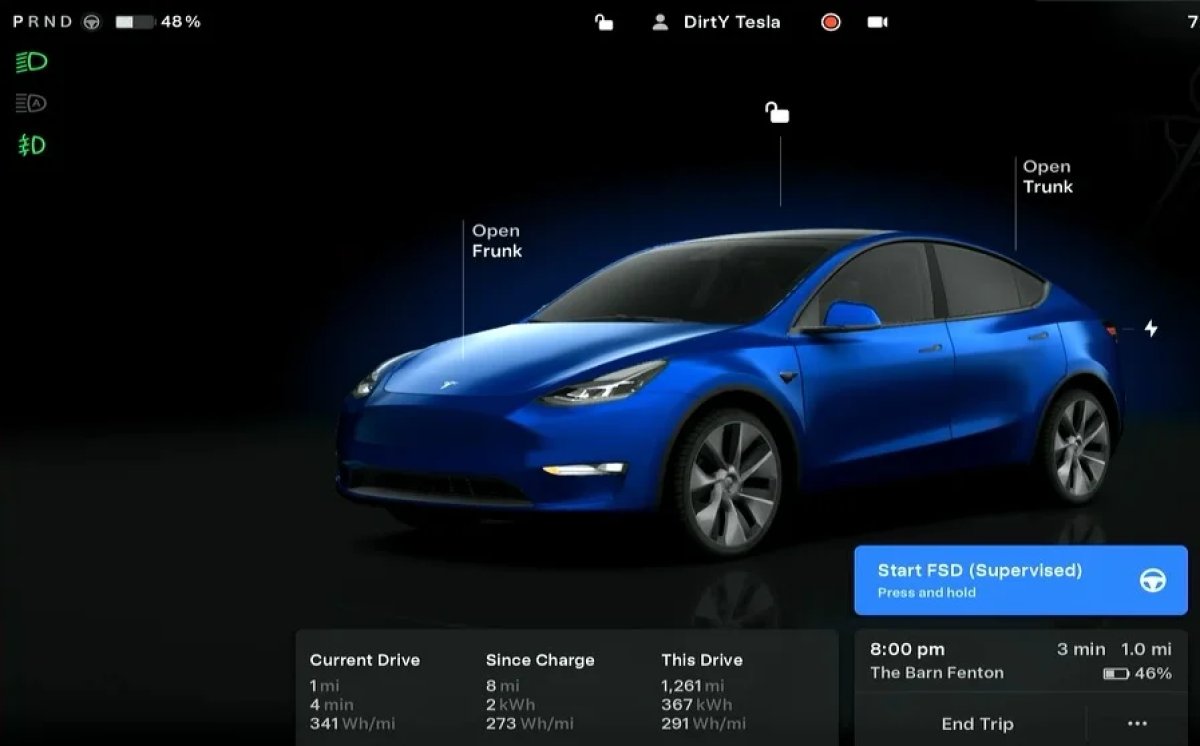
Tesla’s interface is…dynamic, let’s say. Settings frequently move around with software updates, so locating the FSD controls can sometimes be a scavenger hunt. As of early 2026, the primary FSD settings are accessed through Autopilot > Full Self-Driving (Supervised) on your touchscreen. This menu allows you to engage and disengage FSD, adjust settings, and view FSD logs.
One of the key settings is "Engagement Speed." This determines the speed at which FSD will activate when you pull the Autosteer stalk down twice. I recommend starting with the default setting and gradually increasing it as you become more comfortable with the system. Be cautious when increasing this speed, as it can reduce your reaction time in unexpected situations.
"Following Distance" controls how much space FSD maintains between your vehicle and the car in front. A shorter following distance can feel more natural in light traffic, but a longer distance provides a greater safety margin. Experiment with different settings to find what feels most comfortable for you. The 'Vision Auto' feature, new in 13.2, automatically adjusts settings based on detected conditions.
Accessing and interpreting the FSD logs can be invaluable for understanding the system’s behavior. These logs record detailed information about FSD’s decision-making process, including object detections, lane changes, and disengagements. While the logs can be complex, they can help you identify patterns and understand why FSD behaved in a certain way. This feature is still evolving, and Tesla is expected to provide more user-friendly tools for analyzing FSD logs in future updates.
FSD 13.2: Owner Insights
- Aggressive Following Distance - Several owners report a more comfortable experience by setting the following distance to 'Far' or 'Highest'. This seems to reduce phantom braking, particularly in heavier traffic. One user noted a significant improvement on highway commutes.
- Creep Feature Adjustment - The 'Creep' setting, controlling how the car behaves at stoplights, is a common point of adjustment. Many are disabling it entirely, finding the slight roll forward unnerving. Experiment to find your preference.
- Lane Change Behavior - Owners are finding the lane change behavior in 13.2 is more assertive. Some suggest initially keeping 'Navigate on Autopilot' disengaged on highways until comfortable with the new logic, then re-enabling it.
- Intersection Handling - Reports indicate improved, but still imperfect, intersection handling. Pay close attention during the initial drives, particularly with unprotected left turns. Owners are emphasizing the need to remain attentive and ready to intervene.
- Visualization Settings - Utilizing the visualization settings (found under Autopilot > Full Self-Driving Beta) to display the predicted paths of surrounding vehicles can increase driver understanding of FSD’s decision-making process. This helps build trust and identify potential areas for intervention.
- Emergency Stop Distance - Some users are experimenting with the emergency stop distance setting, finding that a slightly longer distance provides a smoother, less abrupt braking experience in certain scenarios. However, caution is advised when adjusting this setting.
- City Street Profiles - Owners suggest creating multiple driver profiles, each with different FSD settings tailored to specific driving conditions (e.g., one for highway, one for city streets). This allows for quick adjustments based on the environment.
Mastering Unprotected Left Turns: A Deep Dive
Unprotected left turns – those made across oncoming traffic without a dedicated green arrow – remain the Achilles’ heel of most self-driving systems, and FSD 13.2 is no exception. The system relies heavily on object detection to identify gaps in traffic and assess the safety of making the turn. It’s a complex calculation involving estimating the speed and trajectory of oncoming vehicles, as well as predicting the behavior of pedestrians and cyclists.
FSD 13.2 appears to be more cautious than previous versions, often taking longer to assess the situation before committing to the turn. This can be frustrating for drivers accustomed to making quick decisions, but it’s a positive step towards improving safety. However, the system can still be overly hesitant, missing opportunities to make safe turns. Sometimes, it will simply wait indefinitely, requiring driver intervention.
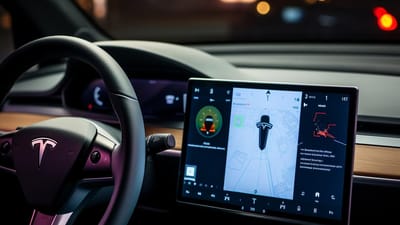
To anticipate the system’s behavior, pay close attention to the visual cues displayed on the touchscreen. The screen shows detected vehicles and pedestrians so you can see what the car sees. Be prepared to take over control if you disagree with the system’s decision or if you feel the situation is becoming unsafe. Remember, you are ultimately responsible for the safety of the vehicle.
The ethical considerations of allowing a machine to make these decisions are significant. Who is liable in the event of an accident? How does the system balance the risk to occupants with the risk to pedestrians and other road users? These are complex questions that are still being debated. It’s crucial to approach FSD with a healthy dose of skepticism and to always be prepared to take control.
Troubleshooting Common FSD 13.2 Issues and Errors
Even with the improvements in FSD 13.2, you’re bound to encounter issues. Phantom braking – the sudden and unexpected application of the brakes – remains a common complaint. This is often caused by false positives in object detection, where the system misinterprets a stationary object as an obstacle. If you experience phantom braking, try disengaging FSD and re-engaging it after a short period.
Disengagements – instances where FSD unexpectedly relinquishes control – can occur in a variety of scenarios, such as complex intersections, construction zones, or inclement weather. If FSD disengages, calmly take over control of the vehicle and try to understand why the system disengaged. Reviewing the FSD logs can provide valuable insights.
Errors related to lane keeping, such as drifting out of lane or struggling to maintain a consistent position, can be caused by poor lane markings, adverse weather conditions, or sensor obstructions. Ensure your windshield is clean and that the lane markings are clearly visible. If the problem persists, report the issue to Tesla support.
Reporting bugs to Tesla is crucial for improving the system. Use the Tesla app to submit detailed reports, including screenshots or videos of the issue. The more information Tesla receives, the better it can identify and address problems. Understanding the system's limitations and knowing when to disengage are key to a safe and enjoyable FSD experience.
Optimizing FSD for Different Driving Environments
FSD’s performance isn’t uniform across all driving environments. City streets present a unique set of challenges, with pedestrians, cyclists, and frequent stop-and-go traffic. In these conditions, a longer following distance and a more conservative engagement speed are recommended. Be particularly vigilant for pedestrians and cyclists crossing the road.
On highways, FSD generally performs more reliably, but it’s still important to remain attentive. Adjust the following distance to suit the traffic conditions and be prepared to take over control when merging or exiting the highway. Pay attention to the system’s behavior in construction zones, where lane markings may be unclear or nonexistent.
Rural roads, with their winding curves and limited visibility, require extra caution. Reduce the engagement speed and be prepared to disengage FSD if the system struggles to navigate the road. Inclement weather, such as rain, snow, or fog, can significantly degrade FSD’s performance. In these conditions, it’s best to avoid using FSD altogether.
Lighting conditions and road markings also play a role. FSD performs best in well-lit conditions with clear lane markings. At night or in low-light conditions, the system’s performance may be reduced. Dark or faded lane markings can also cause problems. The system is improving, but these factors still impact performance.
Beyond the Basics: Advanced FSD Techniques and Tips
Once you’re comfortable with the basics of FSD, you can start exploring more advanced techniques to maximize its capabilities. Utilizing the navigation system effectively is crucial. Setting a destination allows FSD to anticipate upcoming maneuvers, such as lane changes and turns, and to adjust its behavior accordingly. The system will also attempt to navigate complex intersections and highway interchanges.
The lane change feature can be used strategically to overtake slower vehicles or to prepare for an upcoming turn. However, it’s important to use this feature judiciously and to always be aware of your surroundings. Avoid initiating lane changes in heavy traffic or when there are vehicles in your blind spots. The system isn't perfect at judging gaps.
Understanding how FSD interacts with other vehicles is also important. The system attempts to anticipate the behavior of other drivers, but it’s not always successful. Be prepared to take over control if you see another driver making an erratic or unexpected maneuver. Pay attention to the system's visual cues and be ready to react quickly.
Data collection is essential for improving FSD’s performance. Tesla uses data from its fleet of vehicles to train its neural networks and to identify areas for improvement. By allowing Tesla to collect data from your vehicle, you’re contributing to the development of a safer and more reliable autonomous driving system.
Staying Updated: The Future of Tesla FSD
FSD is a rapidly evolving technology, and staying up-to-date on the latest developments is crucial. Tesla regularly releases software updates that introduce new features, improve performance, and address bugs. Follow Tesla’s official announcements on its website and social media channels to stay informed.
Community forums, such as Tesla Motors Club and Reddit’s r/TeslaFSD, are also valuable resources for learning about FSD. These forums provide a platform for owners to share their experiences, discuss tips and tricks, and report issues. Independent reviews and analyses can offer a more objective perspective on FSD’s performance.
The potential for future features, such as end-to-end neural networks and improved object recognition, is immense. End-to-end neural networks would allow FSD to learn directly from raw sensor data, eliminating the need for hand-engineered rules and heuristics. Improved object recognition would enable the system to better identify and classify objects in its surroundings.
The long-term outlook for FSD is uncertain, but the technology has the potential to revolutionize transportation. As FSD becomes more reliable and capable, it could significantly reduce traffic accidents, improve traffic flow, and free up drivers’ time. It’s a bold vision, and while challenges remain, Tesla is making steady progress towards achieving it.
No comments yet. Be the first to share your thoughts!